i2c / SPI character LCD backpack - STEMMA QT / Qwiic
Character LCDs are a fun and easy way to have your microcontroller project talk back to you. They are also common, and easy to get, available in tons of colors and sizes. We've written tutorials on using character LCDs with an Arduino (or similar microcontroller) but find that the number of pins necessary to control the LCD can be restrictive, especially with ambitious projects. We wanted to make a 'backpack' (add-on circuit) that would reduce the number of pins without a lot of expense.
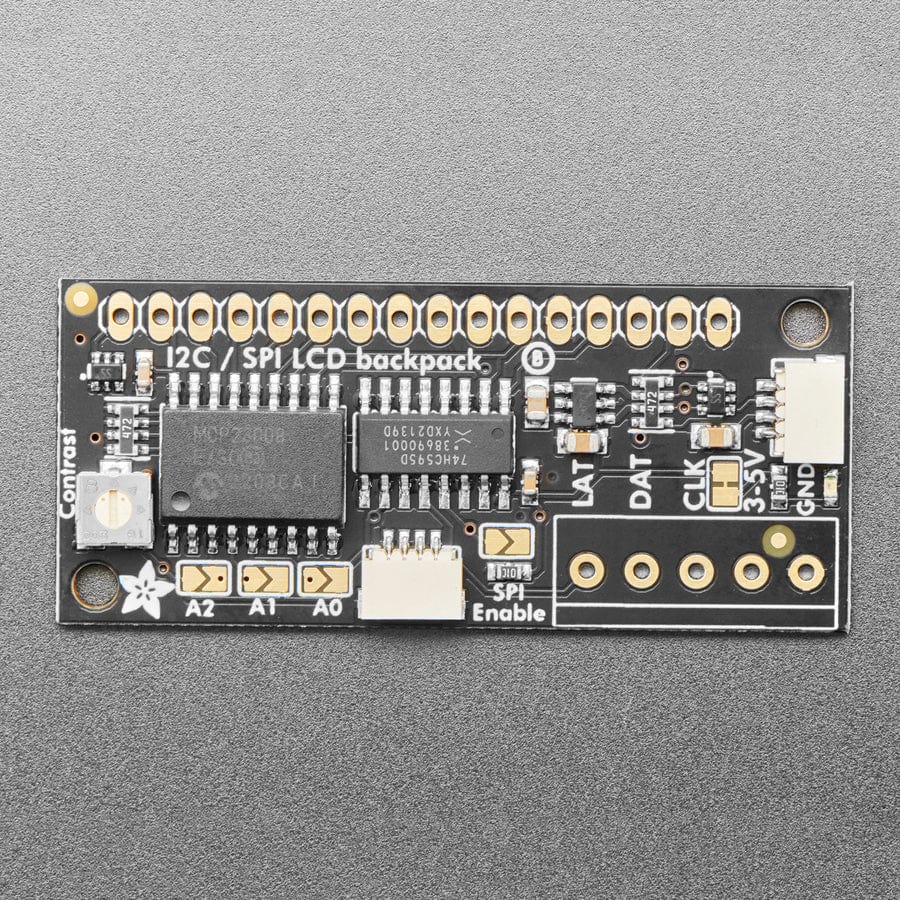
By using simple I2C and SPI input/output expanders we have reduced the number of pins, while still making it easy to interface with the LCD. Only 2 pins are needed for I2C, 3 for SPI. For Arduino and CircuitPython/Python users, we provide an easy-to-use library that is backwards compatible with projects using the '6 pin' wiring. This backpack comes with a 2-pin and 3-pin terminal block as shown (you can snap it together to make a 5-pin terminal and then solder it to the backpack for easy wiring).
This backpack will work with any 'standard' character LCD, from 8x1 to 20x4 sizes! As long as they have a 16-pin single-line connection header at the top. We carry a few LCDs that work great. We suggest using our blue & white 20x4 or 16x2 LCDs. Note that it does not work with 16x2 OLED displays.
You can try to connect our RGB 16x2 or 20x4 LCDs, but this backpack will not control the RGB backlight so you'll have to use the backpack only for the 14 digital IO pins (pins #1-14) and connect the backlight pins (#15-#18) directly to your microcontroller with 4 extra wires for color/PWM control as if they were just an RGB LED.
Advanced users can repurpose the backpack for general purpose I/O expansion: the MCP23008 has 8 i/o pins (7 are connected) with optional pull-ups, the SPI 74HC595 has 7 connected outputs.
For a detailed tutorial on usage, including an Arduino library, wiring diagrams, and files, please visit the product page
Specifications
Revision History
As of April 5th, 2023 - This backpack now comes with a big re-spin that makes lots of improvements:
- We've added a 3-5V boost circuit so you can use this backpack to control 5V LCDs even with 3V power and logic.
- The contrast potentiometer is a lot nicer and easier to twist using a small screwdriver
- Added SparkFun qwiic compatible STEMMA QT connectors for the I2C bus so you don't even need to solder the I2C and power lines. Just wire up to your favorite micro using a STEMMA QT adapter cable. QT Cable is not included, but we have a variety in the shop.
- Functionality and size/shape are the same - mechanically and code-wise it is a drop-in replacement
- We've also updated this PCB with Adafruit Pinguin to make a lovely and legible silkscreen.
EagleCAD PCB GitHub files and Fritzing object available in the product tutorial
- This board/chip uses I2C 7-bit address between 0x20-0x27, selectable with jumpers
- Works with 16x2 and 20x4 Character LCDs
- It does not work with 16x2 OLED displays
- Note: The terminal blocks included with your product may be blue or black.
Resources
Original: $9.60
-65%$9.60
$3.36



Description
Character LCDs are a fun and easy way to have your microcontroller project talk back to you. They are also common, and easy to get, available in tons of colors and sizes. We've written tutorials on using character LCDs with an Arduino (or similar microcontroller) but find that the number of pins necessary to control the LCD can be restrictive, especially with ambitious projects. We wanted to make a 'backpack' (add-on circuit) that would reduce the number of pins without a lot of expense.
By using simple I2C and SPI input/output expanders we have reduced the number of pins, while still making it easy to interface with the LCD. Only 2 pins are needed for I2C, 3 for SPI. For Arduino and CircuitPython/Python users, we provide an easy-to-use library that is backwards compatible with projects using the '6 pin' wiring. This backpack comes with a 2-pin and 3-pin terminal block as shown (you can snap it together to make a 5-pin terminal and then solder it to the backpack for easy wiring).
This backpack will work with any 'standard' character LCD, from 8x1 to 20x4 sizes! As long as they have a 16-pin single-line connection header at the top. We carry a few LCDs that work great. We suggest using our blue & white 20x4 or 16x2 LCDs. Note that it does not work with 16x2 OLED displays.
You can try to connect our RGB 16x2 or 20x4 LCDs, but this backpack will not control the RGB backlight so you'll have to use the backpack only for the 14 digital IO pins (pins #1-14) and connect the backlight pins (#15-#18) directly to your microcontroller with 4 extra wires for color/PWM control as if they were just an RGB LED.
Advanced users can repurpose the backpack for general purpose I/O expansion: the MCP23008 has 8 i/o pins (7 are connected) with optional pull-ups, the SPI 74HC595 has 7 connected outputs.
For a detailed tutorial on usage, including an Arduino library, wiring diagrams, and files, please visit the product page
Specifications
Revision History
As of April 5th, 2023 - This backpack now comes with a big re-spin that makes lots of improvements:
- We've added a 3-5V boost circuit so you can use this backpack to control 5V LCDs even with 3V power and logic.
- The contrast potentiometer is a lot nicer and easier to twist using a small screwdriver
- Added SparkFun qwiic compatible STEMMA QT connectors for the I2C bus so you don't even need to solder the I2C and power lines. Just wire up to your favorite micro using a STEMMA QT adapter cable. QT Cable is not included, but we have a variety in the shop.
- Functionality and size/shape are the same - mechanically and code-wise it is a drop-in replacement
- We've also updated this PCB with Adafruit Pinguin to make a lovely and legible silkscreen.
EagleCAD PCB GitHub files and Fritzing object available in the product tutorial
- This board/chip uses I2C 7-bit address between 0x20-0x27, selectable with jumpers
- Works with 16x2 and 20x4 Character LCDs
- It does not work with 16x2 OLED displays
- Note: The terminal blocks included with your product may be blue or black.